
Last updated on
Oct 19, 2026

Medrecs Declaration of Custodian of Records 2009-2026 free printable template
pdfFiller is not affiliated with any government organization

Fill out
Complete the form online in a simple drag-and-drop editor.

eSign
Add your legally binding signature or send the form for signing.

Share
Share the form via a link, letting anyone fill it out from any device.

Export
Download, print, email, or move the form to your cloud storage.
Why pdfFiller is the best tool for your documents and forms


End-to-end document management
From editing and signing to collaboration and tracking, pdfFiller has everything you need to get your documents done quickly and efficiently.
Accessible from anywhere
pdfFiller is fully cloud-based. This means you can edit, sign, and share documents from anywhere using your computer, smartphone, or tablet.
Secure and compliant
pdfFiller lets you securely manage documents following global laws like ESIGN, CCPA, and GDPR. It's also HIPAA and SOC 2 compliant.
What is Medrecs Declaration of Custodian of Records
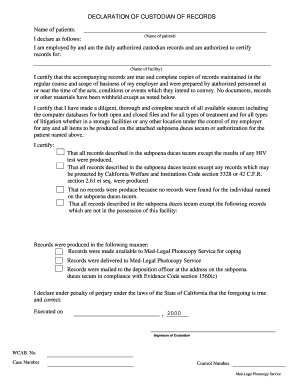
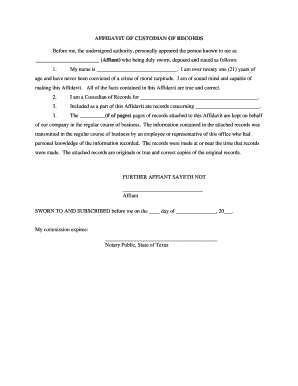
The Declaration of Custodian of Records is a legal document used by custodians and professional photocopiers to certify that attached records are true copies of maintained documents.
pdfFiller scores top ratings on review platforms




Who needs Medrecs Declaration of Custodian of Records?
Explore how professionals across industries use pdfFiller.

Medrecs Declaration of Custodian of Records is needed by:
-
Custodians of Records who manage official documents
-
Professional Photocopiers providing document services
-
Legal professionals preparing court documents
-
Facilities needing compliance with record keeping
-
Organizations involved in court filings and legal processes
-
Anyone requiring certified legal documents
Comprehensive Guide to Medrecs Declaration of Custodian of Records
What is the Declaration of Custodian of Records?
The Declaration of Custodian of Records is a legal document that certifies that the attached documents are true and complete copies of records maintained by a facility. This document serves a crucial function in legal settings, ensuring that records are authenticated and can be relied upon during legal proceedings. By providing a formal declaration, it enhances the integrity of the records, making it a vital component in upholding legal standards.
Purpose and Benefits of the Declaration of Custodian of Records
The primary role of the Declaration of Custodian of Records is to verify the authenticity of records submitted in legal contexts. This certification provides legal assurance that the records presented are accurate and complete, which is essential for any ongoing legal processes. Furthermore, this declaration protects custodians by assigning legal responsibility and clarifying the verification process, thereby facilitating smoother legal transactions.
Key Features of the Declaration of Custodian of Records
This declaration includes essential elements that validate its authenticity. Key features of the form typically encompass:
-
Signature requirements for both the Custodian of Records and a Professional Photocopier.
-
Information fields detailing facility specifics, including address and contact information.
-
Record page counts and details regarding any omitted records.
Understanding these features is critical for ensuring compliance and completeness when preparing the declaration.
Who Needs the Declaration of Custodian of Records?
Professionals who typically require the Declaration of Custodian of Records include legal clerks, healthcare providers, and any other entities maintaining official records. The roles of the Custodian of Records and the Professional Photocopier are especially significant; the former is responsible for ensuring the accuracy of records, while the latter handles the replication of these documents. In many cases, such declarations are essential when evidence must be presented in court.
How to Fill Out the Declaration of Custodian of Records Online (Step-by-Step)
Filling out the Declaration of Custodian of Records online is straightforward. Follow these steps to ensure accuracy:
-
Access the digital form through a reliable platform.
-
Enter facility details, ensuring all information is current and correct.
-
Complete the record page counts while noting any omitted records.
-
Obtain necessary signatures from the Custodian of Records and Professional Photocopier.
-
Review the form for completeness before submission.
Taking care at each step helps to avoid common mistakes that could delay processing.
Submission Methods and Delivery for the Declaration of Custodian of Records
Once completed, the Declaration of Custodian of Records can be submitted through various methods. Users typically have the option to:
-
Submit electronically via an online platform.
-
Print and deliver in person to the relevant legal office.
-
Mail the completed form to the specified address.
After submitting the form, expect confirmation of receipt, and track the status through the submission platform for peace of mind.
Common Errors and How to Avoid Them When Filing the Declaration of Custodian of Records
Users often make specific mistakes while completing this declaration. To avoid issues, pay attention to the following common errors:
-
Incomplete information in required fields.
-
Missing signatures from relevant parties.
-
Failure to review the document before submission.
Establishing a checklist for reviewing all elements of the form can significantly minimize errors and ensure a smooth filing process.
Security and Compliance When Handling the Declaration of Custodian of Records
When managing sensitive documents like the Declaration of Custodian of Records, security is paramount. It is essential to ensure that any platform used for filing complies with privacy laws and data protection regulations, ensuring that personal information is safeguarded. pdfFiller employs 256-bit encryption and adheres to HIPAA and GDPR compliance standards, fostering trust through secure handling practices.
Sample or Example of a Completed Declaration of Custodian of Records
To assist users, a sample or downloadable example of a filled-out Declaration of Custodian of Records can be invaluable. Referring to a completed example showcases how to accurately fill out various sections, helping to guide individuals through the process of preparing their declaration effectively.
Using pdfFiller to Simplify Your Declaration of Custodian of Records Process
Leveraging pdfFiller's tools can greatly enhance the experience of completing the Declaration of Custodian of Records. The platform offers features for editing, signing, and submitting documents online, significantly simplifying the process compared to traditional methods. Users can enjoy convenience and efficiency while ensuring compliance and accuracy with each declaration.
How to fill out the Medrecs Declaration of Custodian of Records
-
1.To begin, access the Declaration of Custodian of Records on pdfFiller by searching for the form in the template library or using the provided link.
-
2.Once you have opened the form, familiarize yourself with the fields available. You will see blank areas for entering specific details about the records and their quantity.
-
3.Before filling out the form, gather all necessary information. This includes records' details, any omitted records you must account for, and the names and signatures of the custodian and professional photocopier.
-
4.Start filling in each section methodically. Click on each field to type in the required information. Use checkboxes where appropriate to indicate included records.
-
5.If you require guidance, refer to the explicit instructions provided in the form’s sections designed for user input. Ensure all fields marked as required are completed satisfactorily.
-
6.After entering all necessary information, take a moment to review it for accuracy and completeness. Ensure that all attached documents are accurate and align with the information provided in the declaration.
-
7.Once you are satisfied with the completed form, save your work using the save function. This option typically appears at the top of the interface.
-
8.Finally, choose to download the completed document or submit it electronically if a submission method is available through pdfFiller. Ensure you retain a copy for your records.

Who is eligible to complete the Declaration of Custodian of Records?
The form is intended for custodians of records and professional photocopiers. These roles must verify and certify document authenticity through signatures.
Are there deadlines for submitting the Declaration of Custodian of Records?
Deadlines vary based on legal requirements or court schedules. It is advisable to check with your local jurisdiction or legal counsel for specific due dates.
How can I submit the Declaration of Custodian of Records?
Submission methods may vary, but typically you may download the completed form to submit it in person, or use electronic submission if authorized. Check local guidelines.
What supporting documents are required with this form?
You usually need certified copies of the records being declared, along with any supplementary documents required by the receiving court or entity.
What are common mistakes to avoid when filling this form out?
Common mistakes include missing required fields, incorrect signatures, or failing to attach necessary documents. Always double-check for completeness.
How long does it take to process the Declaration of Custodian of Records?
Processing times depend on local court schedules and guidelines. Typically, expect processing to take a few days to a few weeks.
Can the Declaration of Custodian of Records be notarized?
This declaration does not require notarizing; however, ensure to check local laws or conditions for any additional requirements that may apply.
Related Forms




Get the latest insights from our blog


If you believe that this page should be taken down, please follow our DMCA take down process
here
.
This form may include fields for payment information. Data entered in these fields is not covered by PCI DSS compliance.